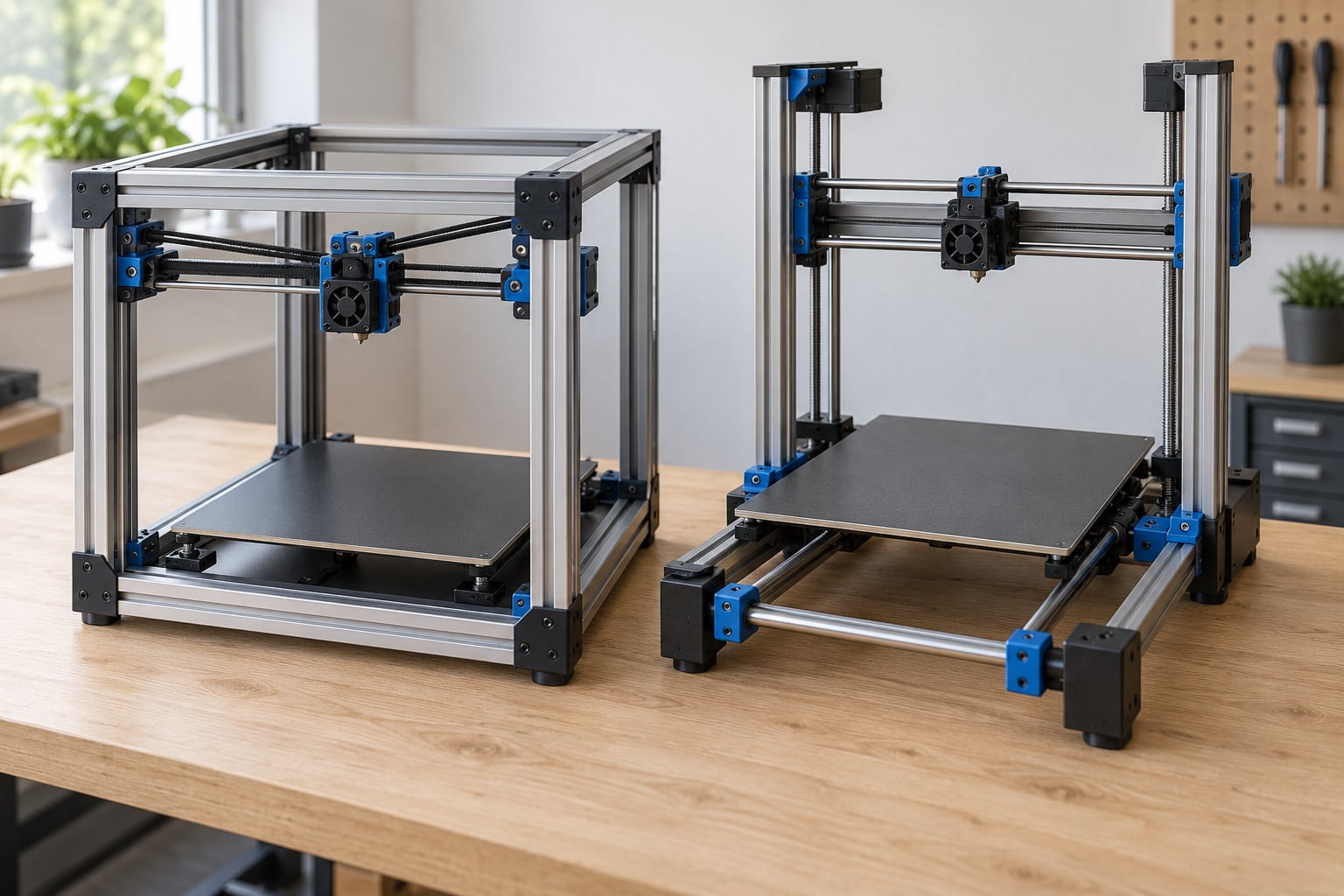
A Cartesian printer, usually sold as a “bed slinger,” dedicates one stepper motor to each axis and physically moves the heated build plate back and forth in Y. A CoreXY printer keeps both X and Y motors bolted to the frame and drives a lightweight toolhead with one closed timing belt path, so only the bed’s Z travel is left. That single design choice decides moving mass, top speed, ringing, enclosure design and the maximum build volume you can build around.
Here is the short version: CoreXY wins on speed, rigidity, tall or heavy parts and warp-prone materials. Cartesian wins on cost, large-format build volume, DIY simplicity and how many spare parts you can buy at any electronics shop.
This guide works through how CoreXY vs Cartesian printer motion systems differ in mechanism, in the numbers people actually quote, and where each side genuinely pulls ahead.
Table of Contents
- 1CoreXY vs Cartesian Printer Motion Systems at a Glance
- 2How Cartesian Printer Motion Works
- 3The trade is simple: cheap stages, heavy moving mass
- 4What the Ender 5 tells you
- 5How CoreXY Printer Motion Works
- 6Why the carriage stays calmer
- 7The 1:√2 pulley reduction
- 8CoreXY vs Cartesian Motion: Print Quality and Accuracy
- 9CoreXY vs Cartesian motion on tall and heavy prints
- 10Dimensional accuracy and squaring
- 11Where the gap has narrowed
- 12CoreXY vs Cartesian Motion: Speed and Acceleration
- 13The acceleration gap is bigger than the speed gap
- 14Where speed claims stop being honest
- 15Diagonal moves
- 16CoreXY vs Cartesian Motion: Mechanical Complexity and Maintenance
- 17Two different CoreXY problems, often confused
- 18Where Cartesian is genuinely easier to live with
- 19Idler quality
- 20CoreXY vs Cartesian Motion: Cost, Size, and Expandability
- 21Belt path length is the ceiling
- 22Footprint and stacking
- 23Enclosures and warp-prone materials
- 24Which Should You Choose?
- 25Pick CoreXY if you are printing ABS, ASA, PC or nylon
- 26Pick CoreXY if print time drives your workflow
- 27Pick CoreXY for tall, heavy or large small parts
- 28Pick CoreXY if you are a beginner who wants results without tuning
- 29Pick Cartesian for large format
- 30Pick Cartesian on a tight budget or for PLA and PETG
- 31Pick Cartesian for DIY builds
- 32Pick either one, but check the firmware
- 33Frequently Asked Questions
- 34What is a CoreXY 3D printer?
- 35Why is CoreXY faster than a Cartesian printer?
- 36What are the disadvantages of using a CoreXY printer?
- 37Do I need input shaping on a CoreXY?
- 38Is CoreXY worth it for a beginner?
- 39Is a bed slinger good enough for ABS and ASA?
- 40Conclusion
CoreXY vs Cartesian Printer Motion Systems at a Glance
The table is the fastest way to see the whole argument. Every row below is expanded later in the guide.
| Factor | CoreXY | Cartesian (bed slinger) |
|---|---|---|
| XY motor placement | Both motors fixed to the frame | One motor per axis; Y motor sits on the gantry |
| What moves in Y | The toolhead | The entire heated bed |
| Typical Y moving mass | 100-200 g for a light toolhead | 500-1000 g for a bed and part |
| Build plate motion | Z only, up and down | X, Y and Z |
| Practical top speed | 150-300 mm/s | 100-200 mm/s |
| Practical acceleration | 10,000-20,000 mm/s² | 2,000-5,000 mm/s² |
| Ringing at speed | Low with input shaping tuned | Noticeable without tuning |
| Frame demand | Rigid cube frame, higher parts count | Simpler open frame, easier to square |
| Build volume ceiling | Limited by belt path length | Scales cleanly to large format |
| Belt tensioning | Four belts, frequent re-tensioning | Two belts, infrequent service |
| Enclosure suitability | Natural fit for a sealed cube | Needs a separate chamber or hood |
| Best fit | Fast small-to-medium work, ABS and ASA | Budget builds, PLA and PETG, large format |
How Cartesian Printer Motion Works
A Cartesian machine does exactly what the name suggests. Three stepper motors drive three perpendicular axes, and each motor moves one thing in one direction. The X motor slides the gantry left and right, the Y motor sits on top of that gantry and drags the build plate front to back, and the Z motor lifts the plate or the gantry up and down.
Because the axes are independent, the math is trivial. A one-to-one belt on each axis means the motor’s own tooth count sets the resolution, usually 16-tooth pulleys on a 1.8-degree stepper motor for roughly 0.1125 mm of nominal movement per full step. Nothing is trying to be clever, and that simplicity is exactly why the design is cheap and easy to repair.
The trade is simple: cheap stages, heavy moving mass
Because the whole bed travels in Y, everything attached to it moves. A heated aluminium plate, a glass or spring steel sheet, a printed part and a chunk of aluminium extrusion all ride back and forth several hundred times per layer. Momentum from that mass is what produces the classic bed slinger wobble on tall prints and the visible ghosting that follows hard corners.
One forum point I see repeated and think is fair: a sliding bed also drags air across the part, which cools layers unevenly on some materials. On PLA that is usually helpful. On a tall, thin ABS part it can add to the problem you were already trying to solve.
What the Ender 5 tells you
Plenty of people assume that a bed which travels vertically means CoreXY. It does not. The Creality Ender 5 is a plain Cartesian machine with Z bed motion, and the Ender 3 in the same family is a classic Y bed slinger. Vertical bed travel says nothing about the XY kinematics.
How CoreXY Printer Motion Works
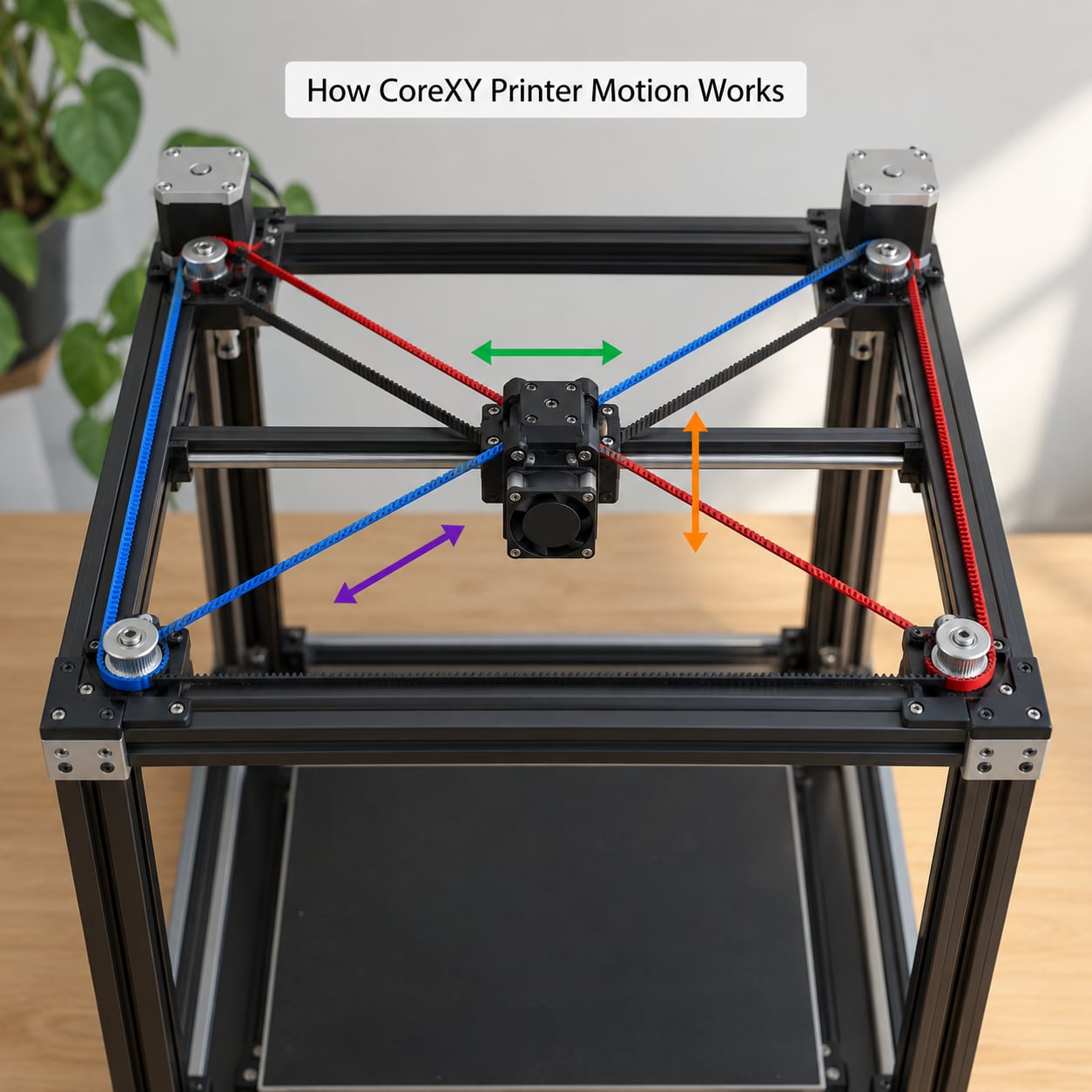
CoreXY was designed at MIT and reverses the usual arrangement. Both XY motors sit still at the rear of the frame, and a single closed loop of timing belt wraps around idler pulleys at each corner. Two belts cross over the top of the machine, and the toolhead grips them at the crossing point.
The logic is elegant. Turn both motors the same direction and the toolhead travels along X. Turn them in opposite directions and it travels along Y. Vary both proportionally and you get a diagonal move. The toolhead is the only part that ever moves in the XY plane.
Why the carriage stays calmer
Nothing large has to reverse direction at speed. A CoreXY toolhead typically weighs 100-200 g, where a bed slinger’s Y stage carries 500-1000 g of plate, glass and part. Light mass accelerates and stops without fighting inertia, so the gantry keeps contact with its rails and layer height stays consistent through corners.
There is a second benefit that rarely gets mentioned: the motors no longer travel. They stay bolted down, run cooler, and never shake loose during a print.
The 1:√2 pulley reduction
Both belts pull on the carriage at 45 degrees, so the motor turns a little further than the head travels in a single axis. The net effect, explained well on the Maker Forums by Ryan Carlyle, is roughly equivalent to running smaller drive pulleys: finer nominal resolution and stiffer torque response, at the cost of some top speed on diagonal moves. It is a real trade, not a free win.
CoreXY vs Cartesian Motion: Print Quality and Accuracy
Print quality is where CoreXY vs Cartesian motion systems separate most clearly, and the reason is mass, not firmware. A bed slinger has to accelerate 500-1000 g in Y at every corner; the frame twists slightly and the layer after the corner lands out of position. That shows up as ringing, ghosting or a leaning tall part.
CoreXY vs Cartesian motion on tall and heavy prints
A tall thin tower on a bed slinger is the classic failure case, because the wobble compounds as the print gets higher. A CoreXY gantry carries that same tower with essentially no Y moving mass, so towers stay vertical and perimeters stay put. For cosplay props, helmet shells and tall enclosures, that difference decides whether you get a usable part on the first attempt.
Dimensional accuracy and squaring
Here the two systems trade places. The Duet3D forum has a line that stays with me: CoreXY may be easier to build, but it is ultimately harder to square. With four belts at 45 degrees, a frame that is not perfectly square pulls the head diagonally and skews the whole print. Keeping a bed slinger square is mostly about two parallel rods and one set of belts.
Where the gap has narrowed
Firmware matters as much as kinematics. Accelerometer-based input shaping on Klipper measures the frame’s real resonance frequency and cancels ringing before it happens, on any frame design. That is the single biggest reason a well-tuned modern Cartesian machine in the mid range can produce parts that look like a much more expensive CoreXY output. Few buying guides mention this, and it changes the maths.
CoreXY vs Cartesian Motion: Speed and Acceleration
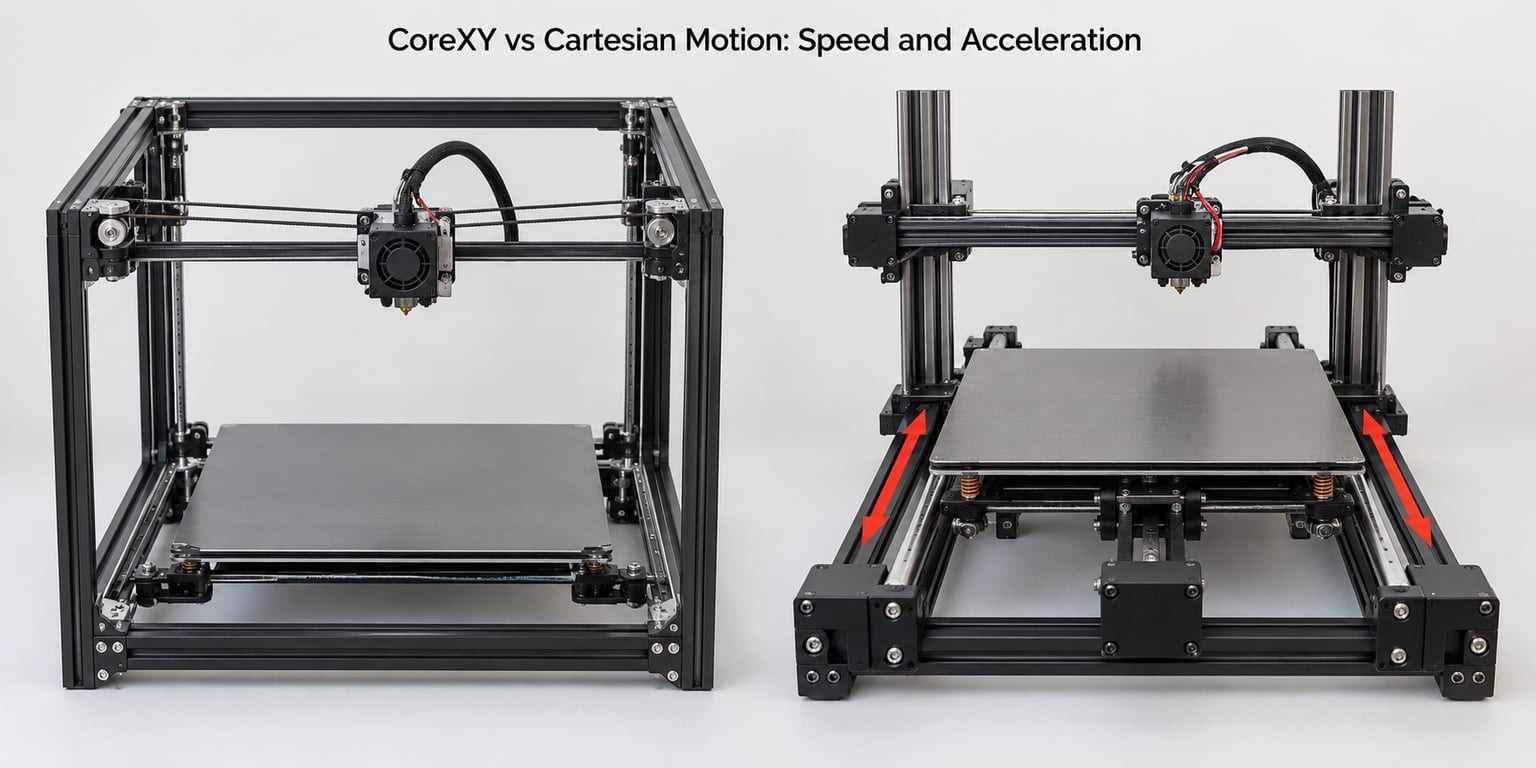
CoreXY is faster because it accelerates less mass, and the numbers people quote are consistent across the industry. Typical CoreXY machines hold 150-300 mm/s; typical Cartesian machines top out around 100-200 mm/s before the frame starts complaining.
The acceleration gap is bigger than the speed gap
Top speed matters less than most people expect, because a print spends most of its time accelerating, decelerating and cornering. CoreXY machines run 10,000-20,000 mm/s² against 2,000-5,000 mm/s² for a bed slinger. That is the difference between a print that keeps its programmed feed rate and one that repeatedly slows down at every corner.
The result shows up as wall-clock time rather than top speed. Vendor benchmarks on the same 3DBenchy model commonly land 20-30 minutes on a CoreXY against 40-50 minutes on a bed slinger, before you count tuning time.
Where speed claims stop being honest
A machine only hits those numbers if the rest of the machine can keep up. A high-flow hotend, an all-metal hotend for temperature, rigid extrusion and short belt or Bowden paths all cap your usable feed rate. A CoreXY with a cold-side plastic hotend will happily be slower than a well-tuned Cartesian machine.
Diagonal moves
Because of the 1:√2 pulley reduction, the head’s top speed is slightly lower on 45-degree moves. Slicers account for this with junction deviation, so in normal slicing you will not lose time to it. It only shows up in raw moves and speed tests.
CoreXY vs Cartesian Motion: Mechanical Complexity and Maintenance
CoreXY has more parts to build and more parts to keep in tension. Four belts wrap around four idler pulleys and two drive pulleys per machine, and every one of them affects squaring. Long belts stretch, stretch changes squaring, and a stretched belt means a visit with a tension gauge.
Two different CoreXY problems, often confused
Maintenance and diagnosis are separate issues and worth separating. Maintenance is routine and predictable: re-tension the belts every few hundred hours of printing. Diagnosis is the harder one. When a belt jumps a pulley on a CoreXY, the fault can appear on both axes at once, because the belt path is shared, and there is no obvious panel to open. On a bed slinger, a slipped Y belt usually points straight at the Y gantry.
Where Cartesian is genuinely easier to live with
A bed slinger has two belts, a straightforward rod-and-motor layout, and every component is a commodity part. Motors, pulleys, belts and idlers are interchangeable across brands, and half of them can be replaced with something from a local electronics supplier in an afternoon. CoreXY frames, cross members and printed parts are much more design-specific.
Idler quality
CoreXY quality leans on the idlers. A cheap flanged idler under high belt tension is a common source of drag and irregular motion. Smooth dual-bearing idlers make a visible difference in both print quality and the tension you need to hold. Bed slingers care about idler quality too, but the load is lower.
CoreXY vs Cartesian Motion: Cost, Size, and Expandability
Cost is where the two designs separate most in practice, and the price gap has closed a great deal by 2026. At the entry end a bed slinger still costs far less for the same build volume, and at the mid range a CoreXY machine often beats an open-frame Cartesian of equal price on usable speed and finish. What has not closed is the cost per cubic inch of build volume, and that is where large format lives.
Belt path length is the ceiling
Every extra millimetre of build volume lengthens the belt loop. Longer belts stretch more, need more frequent tensioning and accumulate more tolerance error in the geometry. Builders on r/Reprap working on metre-scale machines routinely reject CoreXY for exactly this reason and go Cartesian instead.
The practical rule of thumb: if your target build volume is well past roughly 400 mm on the larger axis, the belt path becomes the limiting factor and a bed slinger is the sane engineering choice.
Footprint and stacking
A CoreXY frame is a cube that can be enclosed, which is its structural advantage. A Cartesian open frame is more rectangular in footprint, cheaper to enclose with panels, and easier to stack vertically in a print farm. Thin prints on a tall bed slinger can also wobble, since the plate has nothing to brace against.
Enclosures and warp-prone materials
This is where the motion system turns into a material decision. An enclosed cube is cheap and natural on a CoreXY, and that makes ABS, ASA, polycarbonate and nylon practical rather than a project. On a bed slinger you either add a chamber or accept that warp-prone materials will need an enclosure and a brim and probably a draft shield.
Which Should You Choose?
Start with the material and the build volume, then let speed follow. Here is the decision path I would walk a new buyer through.
Pick CoreXY if you are printing ABS, ASA, PC or nylon
The enclosure advantage is the strongest single argument. A sealed cube keeps the chamber hot and the airflow controlled, which is most of what warping is about.
Pick CoreXY if print time drives your workflow
If you run machines overnight and care about throughput, the moving-mass difference compounds. Faster acceleration means fewer cornering slowdowns across an entire job.
Pick CoreXY for tall, heavy or large small parts
Towers, cosplay props, helmets and machine parts with fine detail all benefit from a carriage that does not wobble when it reverses.
Pick CoreXY if you are a beginner who wants results without tuning
A well-shipping CoreXY at the mid range generally prints acceptable parts on the first try. For most newcomers, that matters more than the specification sheet. Keep in mind you still have to learn squaring, belt tension and flow calibration.
Pick Cartesian for large format
Above roughly 400 mm on an axis, belt path length, tensioning and cost per volume of build space make a bed slinger the better machine. If you need a metre of build area, stop trying to scale a CoreXY and build Cartesian instead.
Pick Cartesian on a tight budget or for PLA and PETG
If you print PLA at 150 mm/s and never leave home, the extra cost of a CoreXY buys you very little. Spend the difference on a better hotend or a proper enclosure.
Pick Cartesian for DIY builds
Two belts, one rod pair and commodity motors make a bed slinger far easier to align with what you already have in a parts bin. A CoreXY is a more demanding first build.
Pick either one, but check the firmware
Before you decide on kinematics, check whether the machine runs input shaping. A mid-range bed slinger with accelerometer compensation can produce output that rivals an expensive CoreXY. That is a bigger lever on real print quality than the choice of motion system for most buyers.
Frequently Asked Questions
What is a CoreXY 3D printer?
A CoreXY 3D printer keeps both its X and Y stepper motors bolted to the frame and moves a lightweight toolhead with a single closed timing belt loop. Turning the motors the same way moves the head along X, opposite directions moves it along Y, and mixing both gives diagonal travel. The build plate only ever moves up and down on Z, which is why CoreXY machines are usually enclosed cubes with a light gantry.
Why is CoreXY faster than a Cartesian printer?
CoreXY is faster because it accelerates far less mass. A bed slinger must drag 500-1000 g of heated plate, glass and part back and forth in Y on every layer, while a CoreXY moves roughly 100-200 g of toolhead. Typical figures are 150-300 mm/s and 10,000-20,000 mm/s squared for CoreXY against 100-200 mm/s and 2,000-5,000 mm/s squared for Cartesian machines.
What are the disadvantages of using a CoreXY printer?
The core drawbacks are mechanical. Four belts need regular tensioning, the belt path limits how large a build volume you can sensibly use, and the frame must be rigid enough to stop the XY mass shaking. Squaring is harder than on a bed slinger, a belt jumping a pulley is harder to diagnose because both axes share one belt loop, and parts are design-specific. You also need a rigid frame because the moving mass sits high on the machine.
Do I need input shaping on a CoreXY?
Yes, and it matters more than most buyers expect. Input shaping uses an accelerometer to measure your machine’s real resonance frequency and cancels ringing before it happens. A CoreXY already resists ringing well because of its low moving mass, but without input shaping a tall or heavy print can still show ghosting at high acceleration. The same feature on a well-tuned bed slinger closes most of the quality gap and is the reason to reconsider cheaper machines.
Is CoreXY worth it for a beginner?
Usually yes if you are printing at speed or using warp-prone materials. A mid-range CoreXY gives you a fast, enclosed machine that produces clean parts on the first attempt, which reduces frustration. It is less worthwhile if you only print PLA and PETG slowly at home, where the extra cost buys little. Budget for maintenance: CoreXY belts need re-tensioning, and you will still learn flow and squaring calibration.
Is a bed slinger good enough for ABS and ASA?
It can be, but you are adding work. A bed slinger can print ABS and ASA reliably if you add an enclosure or a chamber, use a brim or raft, and control drafts. The moving bed also drags air across the part, which cools layers unevenly. An enclosed CoreXY handles the same materials with less setup, which is the practical reason shops moving to warp-prone filaments tend to choose it.
Conclusion
Decide the motion system by material and build volume first, then let speed and cost settle themselves. Warp-prone filaments, fast production work and parts up to roughly 400 mm point to CoreXY. Large format, tight budgets, PLA-only home printing and a first DIY build point to Cartesian.
Before you commit either way, run an input shaping test. Kinematics decide the ceiling; the accelerometer decides how much of that ceiling you actually reach.